Best tablet for construction: what the spec sheet must show
The best tablet for construction isn't a marketing phrase. It's a spec sheet that survives dust, drops, rain and glove hands. Here's the checklist we tell buyers to use before they commit.
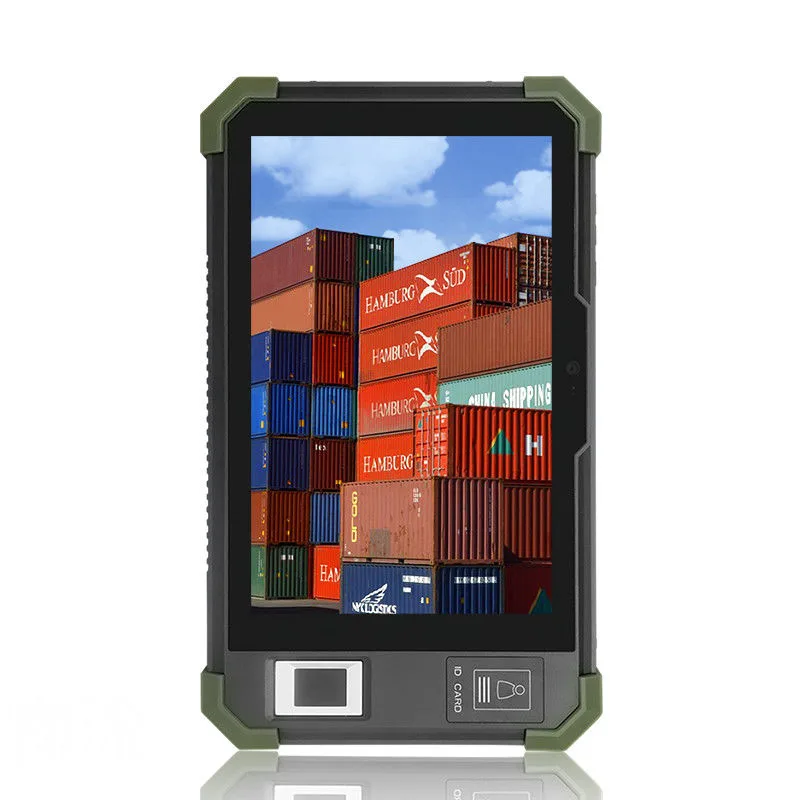
The best tablet for construction isn't a marketing phrase. It's a spec sheet that survives dust, drops, rain and glove hands. Here's the checklist we tell buyers to use before they commit.
What 'rugged' really means: IP codes, drops, and vibration
IP codes have two digits. The first digit rates solids, mainly dust. The second digit rates liquids. A 6 means dust-tight. A 5 means protected against low-pressure water jets from any direction. That's not submersion. An IP65 tablet can take rain and hose spray, but don't drop it in a bucket.
Drop and vibration are separate. A tablet can pass an IP test and still crack when it falls off a scaffold. Ask the supplier which drop standard they tested to. The Android Enterprise Recommended program, for example, requires rugged devices to pass a published drop test requirement. That's a useful baseline. Our two rugged models, the HG805G and HGN801, are listed at IP65. They're designed for dust and water spray, not underwater. Vibration is another thing. A tablet bolted to a bulldozer sees constant shaking. We test with vibration tables in our QC process, but we don't publish a specific vibration rating for these models. Ask for the test report if your job site is high-vibration.
Don't buy "rugged" on the word alone. Get the IP code, the drop test standard, and the vibration spec in writing. If the supplier won't give you that, keep looking.
Screen readability in sunlight: nits and optical bonding
Nits measure brightness. One nit is one candela per square meter, and more nits means a brighter screen under direct sun. A laptop screen might be 300 nits. A phone in sunlight might need 800 or more. The exact number you need depends on how much direct sun your crew works in.
But brightness is only half the story. Optical bonding is the other half. It's a process that fills the air gap between the LCD and the cover glass with a clear adhesive. Without bonding, light bounces between the layers and washes out the image. With bonding, reflections drop and contrast improves. Some sunlight readable tablet specs claim high nits but skip bonding. That's a trap. A dim bonded screen can beat a bright air-gapped one in real sun.
If your job site is bright daylight, ask us or any supplier for a sunlight-readable spec, and ask whether the screen is optically bonded. Don't assume "IP65" means "readable outdoors." It doesn't.
Glove and wet-touch: the usability test spec sheets miss
Capacitive touch screens sense your finger's electrical field. Thick work gloves block that field. Water on the screen confuses it. A tablet that works fine in an office can be useless on a rainy site with gloved hands.
Glove mode and wet-touch tuning are real features, but they're not standard. Some firmware boosts touch sensitivity. Some screens use special controllers. Most spec sheets don't mention them at all. That's a problem because you won't know until you try it.
Our advice: request a demo unit or a sample before you order a fleet. Put on the gloves your crew actually wears. Spray water on the screen. Tap, swipe, pinch. If the supplier won't send a sample, that's a risk flag. Our rugged models are battery powered and handheld, so we can send one for evaluation if your project is serious. But we won't claim they pass a glove test we haven't run with your specific gloves. Gloves vary a lot.
Battery strategy: hot-swap vs. large fixed cells
A field tablet dies at the worst moment. You have two ways to prevent that. Hot-swappable batteries let a worker pop in a fresh cell without shutting down. Large fixed batteries just last longer, but when they're empty, the tablet is dead until it charges.
Our rugged models are battery powered. The spec tables don't list hot-swap. That means they use a fixed battery. You charge them with a cable or a dock. For a full shift, you'll likely need charging docks in the truck or site office, or a vehicle charger. Ask us about charging options before you commit.
Also ask about battery runtime. We don't publish a runtime number because it depends on screen brightness, GPS use, scanner use, and network. A tablet that lasts 10 hours in a lab might last 6 on a sunny site with GPS on. And ask about replacement policy. Batteries wear out. Can the user replace it, or does it go back for service? That's a fleet cost you need to know.
GPS, scanner, and NFC: matching options to field workflows
Construction work isn't just looking at plans. It's logging locations, scanning materials, and tagging assets. That means you might need GPS, a barcode scanner, or NFC. Don't assume they're built in.
On our rugged models, NFC 13.56 MHz is optional. That's the frequency for most access cards and asset tags. Barcode scanner and 4G are per-order options across our tablet line. GPS is not listed in the spec tables for the rugged models, so ask if you need it. Some buyers use an external Bluetooth scanner instead of an integrated one. That can be cheaper and easier to service, but it's one more device to lose.
Match the options to your workflow. If your crew scans 500 barcodes a day, an integrated scanner is worth it. If they scan ten, a phone camera app might do. NFC is great for tool tracking and access control. GPS matters if you need location stamps on photos or work orders. Confirm which options are integrated versus external before you buy.
Mounting in vehicles and on-site: what to ask before you buy
A tablet in a pickup truck or a forklift needs a mount. The common standards are VESA and RAM. VESA is a pattern of screw holes on the back. RAM is a brand of rugged ball-and-socket mounts. If the tablet doesn't have VESA holes or a RAM-compatible case, you're stuck with custom brackets.
Our rugged models are handheld. They're not vehicle-mount specific. That means you'd need a third-party cradle or case to mount them. Our commercial tablets include wall-mount and L-shape desktop forms, but not vehicle cradles. If your job site needs a fixed mount in a truck, ask us about options, and check the third-party mount's vibration damping. A hard mount without damping will shake the tablet to death on rough roads.
Also ask about power input. A vehicle mount should charge the tablet from the vehicle's 12V or 24V system. Otherwise the battery dies mid-shift. And check the operating temperature range. A tablet left in a hot cab in summer can shut down. Ask for the operating temperature range of the configuration you are quoted.
Android version and update policy: the fleet longevity check
Android version matters more than you think. It determines which apps run, which security patches you get, and how long the fleet stays current. Our rugged models run Android 9.0 on the RK3399 chipset. That's an older version. It works for many field apps, but it won't get the latest Android features or security updates forever.
We offer AOSP builds without Google Mobile Services. That's good for buyers who want to load their own apps and avoid Google licensing. But it also means you manage security updates yourself. The Android Enterprise Recommended program, for reference, requires rugged devices to provide security updates within 90 days for five years. That's a strong standard. We don't claim to meet that for our rugged models. Ask us what firmware update policy we offer for your project, and ask any supplier the same question. A cheap tablet with no update path is a security risk in two years.
If you're a software vendor or reseller, this is critical. Your customers will blame you when the tablet gets hacked or an app stops working. Verify the Android version, the update commitment, and the security patch cadence before you put your brand on it.
Comparison: rugged tablet for construction vs. other options
| Feature | Our rugged models (HG805G, HGN801) | Our commercial tablets | What to ask any supplier |
|---|---|---|---|
| IP rating | IP65 | Not listed | Ask for IP code and test report |
| Screen | 8 inch, 1280x800 (HG805G) | 8 to 32 inch, various | Ask for nits and optical bonding |
| Chipset | RK3399 | RK3288 to RK3576 | Ask for benchmark or app test |
| Android | 9.0 | 4.4.2 to 15 | Ask for version and update policy |
| Battery | Two-cell lithium pack | Wall mount, often PoE | Ask for runtime and replacement |
| Mounting | Handheld | Wall mount, L-shape desktop | Ask for VESA or RAM compatibility |
| NFC | 13.56 MHz optional | Optional on some models | Ask if integrated or external |
This table isn't a verdict. It's a list of questions. The best tablet for construction depends on your specific workflow, not on a generic ranking.
Buyer checklist: copy this before you talk to suppliers
- IP code: Is it at least IP54 for dust and water spray? IP65 for rain?
- Drop test: Which standard, and from what height?
- Vibration: Any rating for vehicle or heavy equipment use?
- Screen: How many nits? Is it optically bonded? Ask for a sunlight demo.
- Glove and wet touch: Can we test with our gloves and water?
- Battery: Hot-swap or fixed? Runtime under real use? Replacement policy?
- Data capture: GPS, barcode scanner, NFC? Integrated or external?
- Mounting: VESA holes? RAM-compatible case? Vehicle power input?
- Android: Exact version? Security patch policy? Firmware update commitment?
- Warranty: How long, and what's covered?
If a supplier can't answer all of these, they're not ready for construction. Move on.
What we make, and what we don't
We make rugged 8-inch tablets with IP65, RK3399, Android 9.0, 3GB RAM and 32GB storage. They're handheld, battery powered, with optional NFC. We also make a wide range of commercial Android tablets from 8 to 32 inches, including 8-inch models for other uses, and we do OEM/ODM for brands that want their own logo and firmware. Our rugged tablet line is built for field work, but it's not a one-size-fits-all solution.
We don't make vehicle cradles or hot-swap battery packs. We don't make consumer iPads or Android phones. Screen brightness depends on the panel option, so ask for the figure of the configuration you are quoted.
If you need something else, tell us. We'll tell you straight whether we can build it or you should look elsewhere.
Get a real quote
Send us your spec list: screen size, IP rating, battery needs, data capture options, Android version, and quantity. We'll answer within 24 hours with what we can do and what we can't. Use the contact page and include your project details. No price games, just specs.
Common questions
What is the best rugged tablet for construction?
There's no single best. Look for IP65 or higher, a drop test rating, sunlight readable screen with optical bonding, glove and wet touch support, and a clear Android update policy. Our 8-inch rugged models offer IP65 and RK3399, but check the full spec list against your site.
What should I look for in a construction tablet?
IP rating for dust and water, drop and vibration resistance, bright optically bonded screen, glove and wet touch, battery strategy (hot-swap or long runtime), GPS/scanner/NFC options, mounting compatibility, and Android version with security updates. Test with your actual gloves and conditions.
Is an iPad good for construction work?
An iPad can work in a case, but it's not inherently rugged. It lacks an IP rating, isn't designed for drops or vibration, and glove touch is limited. For daily field abuse, a dedicated rugged tablet with IP65 and a drop rating is a safer bet.
How important is battery life for field tablets?
Critical. A dead tablet stops work. Hot-swappable batteries let you change cells without downtime. Large fixed batteries last longer but need charging breaks. Ask for real-world runtime with GPS and screen on, and check if the battery is user-replaceable.