Touch screen POS systems: a hardware guide for resellers
Touch screen POS systems are built from a terminal, touch panel, CPU, memory, and ports. This guide explains the hardware choices that matter when you specify or resell a touchscreen POS system.
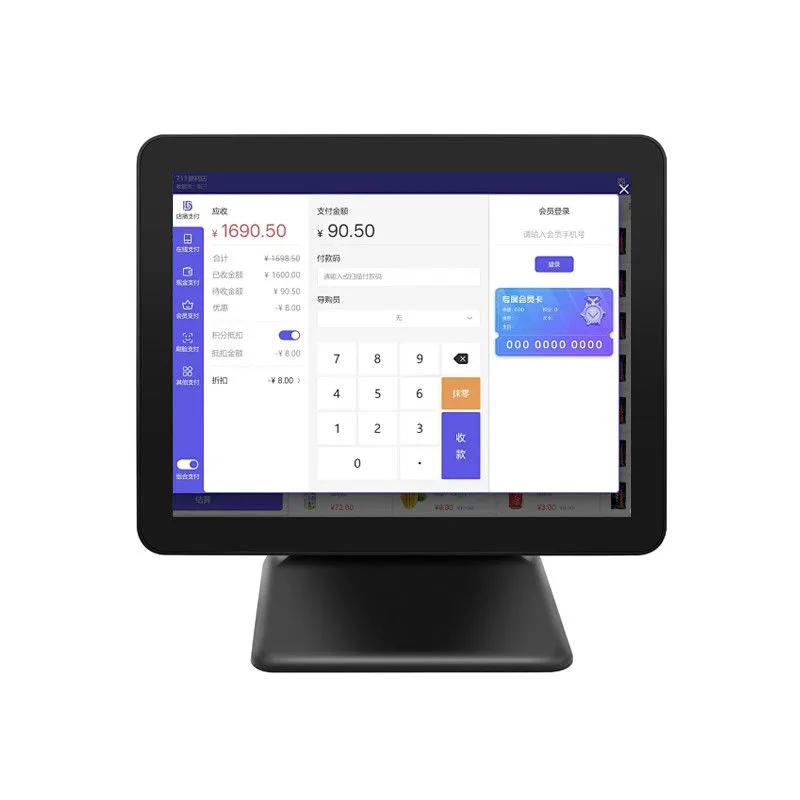
A terminal, touch panel, CPU, memory, ports-that's a touch screen POS system. Here's the thing: hardware choices decide whether it holds up on a counter or fails mid-shift. We make the hardware. You bring the POS software and the payment app. That split keeps you from paying for features you'll never use. It also means you own the hardware stack. Think it through yourself.
What a touch screen POS system is made of (hardware view)
So a countertop POS terminal is just a small industrial computer with a touch display. Inside, you'll find a system on a chip or an Intel N-series CPU. Add RAM, flash storage, Wi-Fi, Bluetooth, Ethernet, and a few USB ports. The display? Usually 15 or 15.6 inches diagonal, IPS panel, capacitive touch layer. Take our HP-P1501. It's got a 15 inch 1920x1080 screen and an Intel N100. The HP1701S steps up to a 17 inch 1366x768 panel and an N5095. Both come as single-screen desktop units.
Peripherals complete the stack. A thermal receipt printer spits out 80 mm or 58 mm paper. A 1D/2D barcode scanner reads items at the counter. A customer display shows line items and totals to the buyer. A cash drawer opens under software control. They connect over USB, RS-232, or Ethernet, and we source them per order. You can also ask for a dual-screen configuration, where a second display faces the customer. Our K11 has a 15.6 inch dual screen, but its N2840 CPU and 2 GB RAM are older. Check if your POS app runs on Windows 7 before specifying it.
Form factor matters more than many resellers think. A countertop terminal works for a fixed checkout lane. But a handheld device like our POS-6000 (5.5 inch, Android, built-in printer) suits line busting or tableside ordering. A self-service kiosk like the I8 (15.6 inch, Android or Windows, wall or floor stand) removes the cashier entirely. We build all three, but the peripherals and mounting differ. Say a chain wants self-checkout. You'll need a kiosk enclosure, a payment reader, and possibly a scale. None of which we make.
Touch technology: capacitive, resistive, and infrared
Capacitive touch is what you get on a modern POS screen. Your finger changes the electrostatic field on a glass overlay. It's smooth, supports multi-touch, and lasts through millions of touches. Resistive touch? Different beast. Two flexible layers press together. Use a stylus, a gloved finger, or a credit card edge. That's why some warehouses and kitchens still rely on it. But resistive screens scratch and lose clarity over time. Infrared touch uses an invisible grid of LEDs and photodetectors around the bezel. It's common on large self-service displays because it scales to 32 inches or more and works with any object. But it's thicker and costs more. So for a countertop POS terminal, capacitive is the default.
Screen size and resolution for POS terminals
Common POS screens run 10.1 to 32 inches. For a cashier-facing terminal, 15 to 15.6 inches hits the sweet spot. Got a compact ordering station? A 10.1 inch screen like our HP525 (1280x800, Android, RK3568) works. But your UI needs small targets. A 17 inch screen like the HP1701S? Easier to read. Yet 1366x768 isn't great for crisp text. Want a sharp panel? Look at the HP-P1501 with 1920x1080. That pixel density? Staff can stare at it all day without strain.
Dual-screen and customer-facing displays change the math. A customer display can shrink to 10.1 inches. It still needs brightness for store lighting. Self-service kiosks often use 21.5 or 27 inches-customers stand farther away. We make Android tablets up to 32 inches, like the SIN-H32 (RK3576, Android 14, 4 GB + 32 GB). Those are wall-mounted panels, not full POS terminals. Counter space constrains size too. So measure the counter before you quote.
Windows vs Android: choosing the right OS
Legacy POS software? Windows is the safe call. If your client runs a .NET app or desktop ERP module, you need it. Our HP-P1501 ships with Windows 10 or 11. The HP1701S ships with Windows 10. Windows 10 IoT Enterprise LTSC 2021 keeps support until 2032, per Pureinfotech. That's a long runway for fixed-purpose devices. Microsoft says Windows IoT Enterprise LTSC is built for devices that don't change over their lifespan, as noted in Microsoft Learn. A POS terminal? Perfect fit.
Android is lighter and easier to lock down. Cloud POS app in a browser? Kiosk app? Android works. Our Android models run Rockchip chipsets and AOSP builds without Google Mobile Services. Clean, branded UI? That's a real advantage. But check the CPU and RAM. Android Enterprise Recommended Knowledge Worker Devices 12.0 demand at least 3 GB RAM, 32 GB storage, 1.4 GHz speed, and 64-bit architecture, per Android's requirements. Some older Android tablets we sell ship with 2 GB RAM and 16 GB storage. Fine for a simple ordering app. Not for heavy multitasking. Specify at least 4 GB RAM and 32 GB storage if the POS app caches images or runs offline.
We're software-agnostic. We don't sell a POS app or payment app. You bring the software. So test your app on the exact chipset and OS version before you commit to a container load.
Peripherals and connectivity: building the full stack
A POS terminal without peripherals is just a small computer. You'll need a receipt printer, a barcode scanner, a customer display, and a cash drawer. Connectivity is the critical question. USB is the most common interface for printers and scanners. For fixed installations, Ethernet is more stable-and it's required if you use PoE. Wi-Fi is convenient, but suffers interference in busy stores. Bluetooth works for handheld scanners and mobile printers. Our Android tablets often include PoE and NFC options. Take the WL1026T: it has PoE and NFC. The WA8058T has both, too. PoE runs power and data over one cable-that simplifies wall mounting. NFC at 13.56 MHz can read contactless cards or tags. But it does not make the device a payment terminal. Payment acceptance requires a certified reader and a payment app.
Driver compatibility is another gotcha. Windows POS terminals often need manufacturer-specific drivers for receipt printers and cash drawers. Android devices use USB host mode or Bluetooth SPP-simpler, but still varies by peripheral. Tell us the exact models during the quote. Don't assume a random USB printer will work out of the box.
Form factors: countertop, handheld, and self-service
Countertop terminals are the workhorse. They sit on a stand or a pole, connect to a cash drawer and printer, and stay put. Our desktop touch POS page lists the single-screen models. A dual-screen countertop terminal adds a customer-facing display, which is useful for transparency and upselling. Our dual-screen POS page covers the K11.
Handheld POS devices are for line busting, tableside ordering, and inventory. The POS-6000 has a 5.5 inch screen, a MediaTek MT6580, Android, and a built-in printer. It's not a phone; it's a ruggedized terminal. Battery life and drop resistance matter more than screen resolution. Check the IP rating if you deploy it in a kitchen or outdoor market. Our rugged tablets like the HG805G (8 inch, IP65) are built for that.
Self-service kiosks are a different beast. They need a large touch screen, a secure enclosure, and often a floor stand. The I8 offers a 15.6 inch screen with an 18.5 to 32 inch option, and it runs Android or Windows. You'll need to add a payment reader, a receipt printer, and possibly a barcode scanner. That's a common gap in a reseller's bill of materials.
What the hardware does NOT include: software and payments
Let's be straight. Our hardware doesn't include POS software. You bring the POS app-cloud web app, native Windows app, Android APK. We can preload an APK or custom launcher, but we don't develop POS logic. That's your value-add.
Payment acceptance? Not ours either. The PCI Security Standards Council defines POS systems as all hardware and software involved in accepting, processing, or transmitting payment card data. That includes card readers and payment terminals, per PCI Compliance. And yes, that definition covers software. But our terminal is just a display and compute unit. No certified card reader. To accept EMV chip or contactless payments, you need a payment app and a certified reader meeting PCI DSS and EMV standards. In December 2019, PCI SSC published Contactless Payments on COTS (CPoC) Security and Test Requirements Version 1.0. It explains how contactless payments can be accepted on commercial off-the-shelf devices-see PCI SSC. That standard? It applies to the payment application and reader, not our hardware. We can't certify a terminal as PCI compliant because we don't have a payment app.
So a buyer asks, "Is this POS terminal PCI compliant?" Honest answer: the terminal itself is out of scope. PCI compliance belongs to the merchant and the payment software. Tell your client to ask their payment provider for a PCI-compliant reader and app. Our hardware is payment-agnostic. It works with any certified reader over USB, Bluetooth, or audio jack.
How to specify a touch screen POS system: a buyer checklist
Here's a checklist you can copy into your RFQ:
- Terminal model and screen size: 15 inch or 17 inch for countertop, 10.1 inch for compact, or self-service size.
- Touch type: capacitive for most, infrared for large self-service screens.
- OS: Windows 10/11 or Android. Confirm your POS app version.
- CPU and RAM: Intel N100 or N5095 for Windows, Rockchip RK3566/RK3568 or better for Android.
- Storage: 128 GB or 256 GB for Windows, 32 GB or 64 GB for Android.
- Connectivity: Ethernet, Wi-Fi, Bluetooth, and PoE if wall-mounted.
- Peripherals: receipt printer (80 mm or 58 mm), scanner (1D/2D), customer display, cash drawer. List exact models.
- Payment: certified reader and payment app from your payment provider. Not included in our hardware.
- Mounting: counter stand, wall mount, or floor stand.
- Branding: logo, boot animation, preloaded apps, custom launcher, housing color.
Unsure? Just send us the POS software's hardware requirements and a list of peripherals. We'll match a terminal from our POS hardware page or propose an ODM build.
Comparison table: common POS terminal configurations
| Configuration | Screen | OS | Typical use | Hopestar example |
|---|---|---|---|---|
| Countertop single screen | 15-17 inch | Windows or Android | Checkout lane, retail | HP-P1501, HP1701S |
| Countertop dual screen | 15.6 inch + customer display | Windows | Full service restaurant | K11 |
| Handheld | 5.5 inch | Android | Tableside, line busting | POS-6000 |
| Self-service kiosk | 15.6-32 inch | Android or Windows | Self-checkout, ordering | I8 |
Words, not invented numbers. This table gives you that. But the right configuration? Well, it depends on your client's workflow and their software.
What to send us for a quote
We don't publish prices. A real quote depends on the configuration, peripherals, and order volume. Send us the following. We'll respond within 24 hours.
- Terminal model or desired screen size, OS, CPU, RAM, and storage.
- Peripherals: receipt printer width, scanner type, customer display, cash drawer.
- Quantity and target trade terms (FOB, CIF, CFR, EXW).
- Branding requirements: logo, boot animation, preloaded apps, custom launcher.
- Your POS software's minimum hardware requirements.
Use the contact page to reach us. We'll spec a hardware bill of materials, not a software or payment solution.
Common questions
What is the best touch screen POS system?
There is no single best system. The right choice depends on your POS software, payment app, and deployment. For a countertop, a 15 inch Windows terminal with an Intel N100 and 8 GB RAM is a safe default. For Android, look for a Rockchip RK3566 or better with at least 4 GB RAM. We build the hardware; you bring the software and payment reader.
What is the best POS touch screen monitor?
A POS touch screen monitor is a touch display without the compute unit. If you need a monitor only, ask for a commercial Android tablet without the stand, but check that it has the right video input for your POS computer.
What is the price of a POS touch screen monitor?
We don't publish prices. Market prices for touch screen monitors vary widely by size, touch technology, and brand. We do not quote third-party price ranges here. The real cost depends on the configuration, peripherals, and order volume. Contact us with your specs for a quote.
What size touch screen monitor is best for a POS system?
15 to 15.6 inches is the sweet spot for a cashier-facing terminal. A 10.1 inch screen works for a compact ordering station but may be hard to read. A 17 inch screen is easier to read but takes more counter space. For self-service, 21.5 inches or larger is common because the customer stands farther away.