Waiting room display hardware: a guide for clinic integrators
A waiting room display is an information terminal, not a medical device. This guide compares large overhead queue screens with small door-side tablets, covers power and mounting, and shows what to ask a hardware supplier.
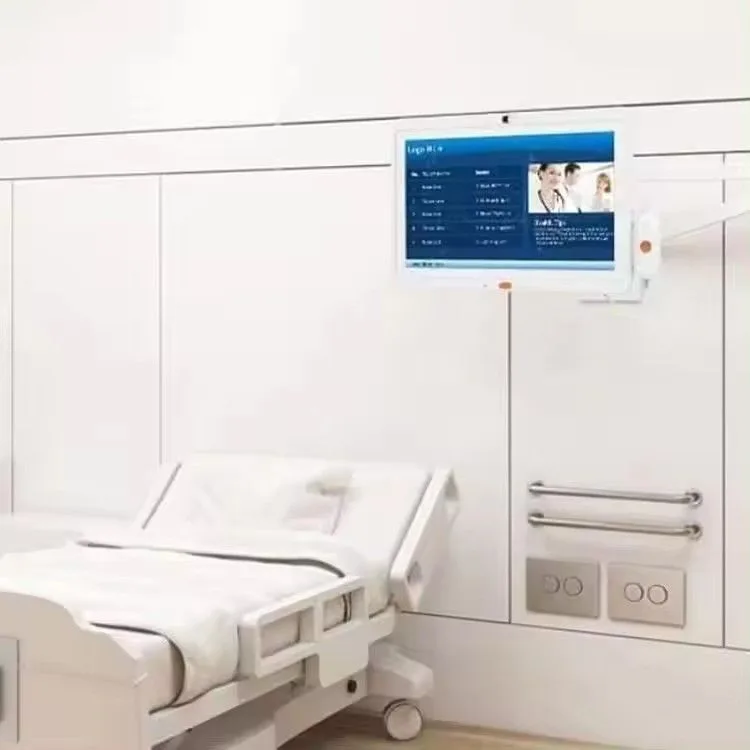
A waiting room display is an information terminal that shows queue status, check-in prompts, announcements, and wayfinding in a clinic. Integrators build the software; we supply the Android tablet hardware it runs on. You'll find two hardware roles in most clinics: a large overhead queue screen for the whole room, and a small door-side tablet outside each consulting room. Neither is a certified medical device. They are call and information terminals, and that distinction matters for scope, compliance, and cost.
What a waiting room display actually does
A waiting room display gives patients a place to look for their queue number, the current room, or a general announcement. It does not collect health data, store records, or make clinical decisions. The integrator's app drives the content. The hardware is a screen, a chipset, and a network connection in a wall mount or desktop form.
We say this plainly because medical device regulations bring design controls, documentation, and liability that a waiting room terminal does not need. A clinic may still have privacy obligations under the FTC Act and HIPAA, but those attach to the clinic and the integrator's data handling, not to the display hardware. Our medical tablets are information and call terminals, not certified medical devices.
Large overhead queue screen vs door-side tablet
An overhead queue screen is a big display, often a 32 inch Android tablet or an LED display, mounted high on a wall. It shows the now-serving number, the next few numbers, and maybe a welcome message. The door-side tablet is a smaller wall mount unit, usually 10.1 or 13.3 inch, mounted next to a consulting room door. It shows the current patient or room status and can include a call handle.
Screen size follows viewing distance. A door-side tablet is read up close, so 10.1 inches is plenty. An overhead queue screen in a large waiting area is read from across the room, so 32 inches or a small LED display works better. The tablets listed on this site top out at 32 inches. For bigger rooms, our indoor LED display series starts at P2 and covers larger formats.
Here is a quick comparison of the two roles:
| Attribute | Overhead queue screen | Door-side tablet |
|---|---|---|
| Typical size | 32 inch tablet or LED display | 8 to 15.6 inch wall mount tablet |
| Viewing distance | Across the room | At arm's length, at the door |
| Content | Queue numbers, announcements, wayfinding | Current patient number or room status |
| Power | DC or PoE, depending on model | PoE or DC, often at the door frame |
| Mounting | High wall, VESA or custom bracket | Door frame or adjacent wall, low profile |
How the display connects to the clinic system
Your app runs on the tablet and pulls queue data from the clinic's scheduling or check-in system over the network. We ship Android tablets with AOSP builds, open ADB, and custom launchers, so you can lock the device to your app and control updates. No Google Mobile Services unless you ask for them.
Connectivity options include Wi-Fi, Ethernet, and optional 4G. For a fixed wall mount, a wired Ethernet connection is more reliable than Wi-Fi in a busy clinic with many devices. Ethernet is a mature standard that has evolved from 10 Mbps to 400 Gbps over copper and fiber, according to IEEE Technology Navigator. Power over Ethernet, specified in IEEE 802.3af, 802.3at, and 802.3bt, adds DC power over the same data cable, which is useful at a door frame.
We do not make the queue software, the check-in portal, or the HIPAA compliance layer. Those are the integrator's scope. The hardware just needs a stable Android platform, reliable networking, and a mount that survives daily cleaning.
Power at the door frame: PoE vs DC
A door-side tablet needs power. You have two practical choices: PoE or a DC adapter.
PoE tablets follow IEEE802.3at/af. The original IEEE 802.3af standard, released in 2003, provided a maximum of 15.4 watts at the power sourcing equipment, with losses reducing that to 12.95 watts at the powered device over 100 meters of cable, as documented by TechTarget. IEEE 802.3at, or PoE+, released in 2009, specifies about 25.5 watts at the powered device. That's enough for a 10 to 15 inch Android tablet with a modest backlight.
PoE simplifies door frame cabling: one Ethernet cable carries data and power, and you can run it through conduit or inside the wall. DC power needs a nearby outlet and often a visible cord, which looks messy and can be a trip hazard. On the other hand, DC adapters are cheap and familiar. If the clinic has no PoE switch or injector, the integrator must add one, which costs money.
For a door-side tablet, we usually recommend PoE when the integrator already manages network switches. It is cleaner, and you can remotely reboot a PoE port. DC is fine for a desktop check-in kiosk or a wall mount near an outlet.
Mounting and screen size by viewing distance
Wall mount tablets in our line range from 8 to 32 inches. For a door-side display, 10.1 or 13.3 inch models are common. The HP1012T is a 10.1 inch wall mount tablet with IEEE802.3at/af PoE and a 1280x800 resolution. The WA1342T is a 13.3 inch wall mount with 1920x1080 and IEEE802.3at. Both are fixed wall mounts, not desktop stands.
For an overhead queue screen, you can use a 32 inch wall mount tablet like the SIN-H32, which runs Android 14 on an RK3576. Or you can use an LED display for a larger, brighter canvas. Our indoor LED display series includes pixel pitches from P2 to P6, with brightness from 800 to 1200 nits. That's enough for a well-lit waiting room.
Mounting matters. Door-side tablets need a low profile bracket that sits flat against the wall and hides the cable. Overhead screens need a VESA mount or a custom bracket rated for the weight. We supply wall mount tablets with VESA patterns on many models, but the installer must check the wall structure and use appropriate anchors.
Privacy on a public screen
A waiting room display is a public screen. Anyone in the room can see it. The integrator's app must not show a full name, a medical condition, or any other protected health information. Instead, show a queue number, a random alias, or an icon.
This is not a hardware feature. The display only renders what the app sends. HIPAA de-identification means removing 18 specific identifiers, including names, dates, and medical record numbers, as described by the FTC in its guidance on consumer health information. A common practice is to assign a random number at check-in and show only that number on the overhead screen and the door-side tablet. Some clinics show a word or a color instead.
We don't build privacy logic into the tablet. The integrator controls the content. But the hardware can help: a locked-down Android build with no user-installable apps, a custom launcher that boots straight into the queue app, and no camera or microphone option. That reduces the chance of accidental data exposure.
Cleaning and hygiene for waiting-area hardware
Clinic staff will wipe down door-side tablets and overhead screens. The hardware should survive that. Use a soft, damp cloth with mild detergent. Avoid harsh chemicals like bleach or ammonia, which can damage the touchscreen coating and the plastic bezel. Power off and unplug the unit before cleaning.
Bezel and mount design matter. A flush wall mount with a sealed front surface is easier to clean than a desktop stand with crevices. We don't publish an IP rating for most wall mount tablets, so they are not sealed against liquid ingress. The HG805G is an 8 inch handheld rugged tablet with IP65, but that's a different form factor, not a waiting room display.
For overhead queue screens, cleaning means dusting and occasional wiping. LED displays have a different surface than LCD panels.
What to send us for a quote
Tell us the screen size, the power option (PoE or DC), the mounting style, and the quantity. We'll quote a wall mount tablet from the models above, or an LED display if the room is large. We don't publish prices because every build depends on configuration, quantity, and trade terms. We offer FOB, CIF, CFR, and EXW, with the nearest port Shenzhen. Our sales team answers inquiries within 24 hours.
Send your spec list to our contact page. Include the model or screen size, RAM and storage needs, PoE requirement, NFC or other options, and the target quantity. We'll confirm the Android build and the warranty (1 year on LCD products, 3 years on LED displays).
Common questions
What is a waiting room display?
A waiting room display is an information terminal that shows queue status, check-in prompts, announcements, or wayfinding in a clinic. It is not a certified medical device. The integrator's app controls the content; the hardware is a screen with a network connection.
What is the difference between a waiting room display and a door-side tablet?
A waiting room display is a large overhead screen, often 32 inches or an LED display, that shows queue numbers for the whole room. A door-side tablet is a smaller wall mount unit, usually 10 to 15 inches, mounted outside a consulting room to show current patient status.
Can a waiting room display show patient names?
It should not. A public screen can be seen by anyone in the room. Show a queue number, a random alias, or an icon instead. Full names and medical information are protected health information and must be de-identified under HIPAA-style privacy rules.
What size screen is best for a waiting room?
For a door-side tablet read up close, 10.1 or 13.3 inches is enough. For an overhead queue screen read from across the room, use a 32 inch tablet or an LED display.