Room scheduling display hardware: a guide for AV integrators
A room scheduling display is a panel outside a meeting room. It shows live availability. People can book or check in on the spot. We make the hardware; you bring the scheduling app.
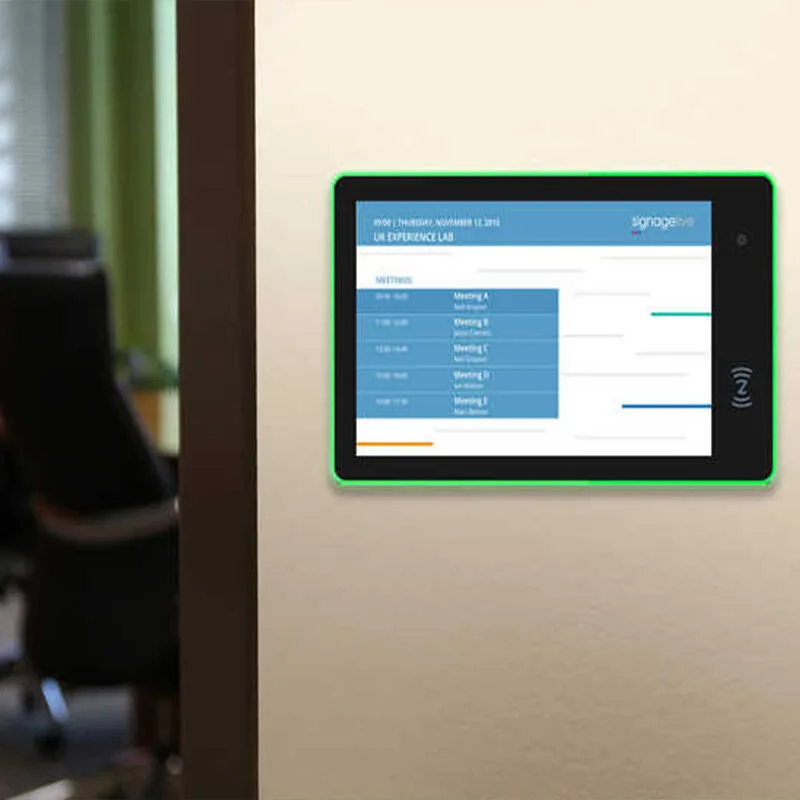
A room scheduling display is a panel outside a meeting room. It shows live availability. People can book or check in on the spot. We make the hardware; you bring the scheduling app. This guide covers what to specify when you buy panels from an OEM like us. They need to survive corporate IT, a busy corridor, and a five-year refresh cycle.
What a room scheduling display actually does
The panel runs one app: your scheduling client. That app talks to your calendar system. Microsoft 365, Google Workspace, or an on-prem Exchange server. The display shows the room name, current meeting, next meeting, and a green or red status. Most panels also let a user book an empty room on the spot. Or check in to hold a reservation. We don't write that software. We build the touch panel, the wall mount, the LED light bar, and the firmware that locks the app into kiosk mode.
Think of it as a fixed-purpose endpoint, not a general tablet. It's bolted to the wall, powered over Ethernet, and configured once. If the scheduling app crashes, the panel should reboot into the same app. That's a firmware and launcher question. And it's one we answer per order.
Screen size and readability from the corridor
Pick the screen by viewing distance, not by what fits the wall plate. An 8-inch or 10.1-inch panel works when people stand within arm's reach. Like a huddle room door. Our WA8058T is 8 inches. The WA1036T and HP1012T are 10.1. For a longer corridor or a glass-walled conference room, step up to 13.3 or 15.6 inches. The WA1342T and PW-1537T fit there. If the panel doubles as wayfinding outside a training center, a 21.5-inch or larger model like the H2152T makes sense. Brightness and anti-glare matter more than resolution at door signage distances. A 1920x1080 panel is plenty. A 400-nit screen that washes out under hallway lights is not.
Mounting height changes readability too. At eye level, a 10-inch panel works fine. Above a door or at an angle, you'll want a larger screen or a brighter backlight. Ask us for a sample if you're unsure.
LED status light bar or surround: what to specify
The LED bar is the first thing a person sees from down the hall. Green means free. Red means booked. Some panels add blue for "checked in" or amber for "ending soon." The color is controlled by the scheduling app over the Android OS. Usually through a simple GPIO or serial command. We provide the hardware; your app team maps the colors.
Our meeting room series includes two LED options. The WA1036T has an LED light bar along one edge. The WA1412T has an LED surround that wraps the whole screen. A surround is more visible from an angle. But it costs a bit more and draws a little more power. If you don't need a status light, most of our other wall-mount tablets skip it. Specify LED early, because the housing is different.
PoE at the door: one cable for power and data
At the door, you want one cable. Power over Ethernet gives you that. Our PoE tablets follow IEEE802.3at/af. That means they work with standard PoE switches and injectors. Cisco's UPOE+ white paper explains that PoE lets a switch provide power and data over standard Ethernet cables. Earlier standards like 802.3af provide up to 15 watts. And 802.3at up to 30 watts. Per TechTarget. That's enough for a 10-inch panel. A 15.6-inch panel with a bright backlight might need 802.3at. So check the power draw before you order.
PoE simplifies installation. No separate power brick, no electrician, no ugly cable. You'll need a PoE switch port or a single-port injector per panel. If your building doesn't have PoE, the tablets also run from a DC adapter and connect over Wi-Fi. They need a nearby AC outlet. That can be a problem above a door. PoE is the cleaner answer for most corporate jobs.
NFC badge check-in and access control
Some companies want tap-to-check-in. That's NFC. Our tablets support 13.56 MHz NFC as a per-order option. The panel reads the employee badge. The scheduling app matches the ID to the booking. And the room status updates. It's not access control by itself. The app may also unlock the door via a separate relay. We don't integrate the door lock. We provide the NFC reader and the Android framework.
When you specify NFC, tell us the badge technology. Most corporate badges are MIFARE Classic, MIFARE DESFire, or HID iCLASS. All at 13.56 MHz. If you need barcode scanning instead, that's a different module. NFC is for badges; barcode is for phones with QR codes.
Mounting on glass vs drywall
Glass walls look great until you drill into them. For glass, you need a glass mount bracket or a strong adhesive plate. The panel hangs on that plate. For drywall, you need anchors or a back box. We ship VESA patterns on many models, so you can use standard mounts. The HP1733T has a VESA 75 pattern, for example. Check the spec table for each model.
Cable routing is the real headache. On glass, you can't hide the cable inside the wall. You'll route it along the frame or through a channel. On drywall, you can run the Ethernet cable inside the wall to a recessed back box. Specify the mount type before ordering. Some models come with a flush glass mount plate, and others have a surface-mount bracket.
Kiosk lock-down through OEM firmware
Corporate IT doesn't want a scheduling panel that can browse the web or install games. That's where OEM firmware comes in. We build Android tablets with a custom launcher, no Google Mobile Services, and open ADB. We can lock the device to a single app through a custom launcher. We can also preload your scheduling APK.
This is a hardware-level lockdown, not just a kiosk app from the Play Store. Android 11 and newer versions have better kiosk mode support. But the build matters. If you need Google Play services, say so. Otherwise we ship a clean AOSP build. Your app must not depend on Google APIs if you want the clean build. We can work with your app team to test.
Comparison: which Hopestar panel fits your door
| Model | Screen | PoE | NFC | LED | Form |
|---|---|---|---|---|---|
| WA8058T | 8" | Yes | Yes | Ask | Wall mount |
| WA1036T | 10.1" | Ask | Ask | Light bar | Wall mount |
| WA1412T | 14" | Optional | Optional | Surround | Wall mount |
| PW-1537T | 15.6" | Yes | Yes | Ask | Wall mount |
| HP1733T | 17.3" | Optional | Ask | Ask | Wall mount, VESA 75 |
Buyer checklist before you ask for a quote
- Screen size and mounting height for each door type
- PoE or Wi-Fi? If PoE, 802.3af or 802.3at?
- LED status light: bar, surround, or none?
- NFC badge check-in: yes or no? Badge technology?
- Mounting surface: glass, drywall, or other? VESA pattern needed?
- Firmware lockdown: custom launcher, no GMS, open ADB? Single app?
- Android version requirement from your scheduling app
- Quantity and target ship date
What to send us for a quote
Tell us the screen size, PoE or Wi-Fi, LED option, NFC, mounting surface, and firmware requirements. Send your scheduling app's minimum Android version and any API dependencies. Include quantity and target ship date. We'll reply within 24 hours with a spec sheet and a sample plan. Contact us here. We don't publish prices; a real quote depends on your configuration.
Common questions
What is a room scheduling display?
A room scheduling display is a wall-mounted touch panel outside a meeting room. It shows live availability, the current meeting, and the next meeting. It runs a scheduling app that connects to your calendar system. Users can book or check in from the panel. We make the hardware; the software is separate.
How does a room scheduling display connect to Microsoft Teams or Zoom Rooms?
The panel runs a scheduling app that integrates with Microsoft 365 or Zoom's calendar API. The app handles authentication and sync. Our hardware just runs Android and connects to your network. You need a scheduling app that supports Teams or Zoom. We can preload it and lock the panel into kiosk mode.
Can I use any Android tablet as a room scheduling display?
Technically yes. But a consumer tablet lacks PoE, a wall mount, an LED status light, and kiosk lock-down. It'll also die sooner in 24/7 use. A commercial panel like ours is built for fixed installation. Its firmware can be locked to a single app with no Google services. That's what corporate IT needs.
What is the difference between a room scheduling display and a room booking panel?
They're the same thing. 'Room booking panel' is a common synonym. Both refer to a dedicated touchscreen outside a meeting room. It shows availability and allows booking or check-in. We use 'room scheduling display' as the hardware category. But buyers use both terms interchangeably.